BISP 8171 Eligibility Check: How to Verify Your Status in 2026
Are you trying to find out whether your family qualifies for financial assistance through the Benazir Income Support Programme (BISP)?
You may have heard that you can check your eligibility by sending your CNIC number to 8171. However, many people are unsure which website to use, what the response means, or what to do if their household information isn’t available.
The good news is that BISP provides official methods to check household eligibility through its 8171 web portal and SMS service.
If your family’s information is missing or needs updating, you can also contact a BISP Tehsil Office for guidance about the National Socio-Economic Registry (NSER) survey.
In this guide, we’ll explain how to complete a BISP 8171 eligibility check in 2026, how to verify your status using your CNIC, what the different responses may mean, and how to avoid fraudulent registration offers.
What Is BISP 8171?
The Benazir Income Support Programme (BISP) is a social protection programme of the Government of Pakistan.
It provides financial assistance to eligible low-income households through programmes such as Benazir Kafaalat.
BISP uses the National Socio-Economic Registry (NSER) and household assessment information to determine eligibility for relevant assistance programmes.
8171 is BISP’s official SMS number for communicating important information to beneficiaries.
People can use the 8171 service to check eligibility information, while eligible beneficiaries may receive official messages about payments and other programme matters.
BISP has repeatedly warned the public that messages claiming to be from the programme but sent through other mobile numbers should not be trusted.
BISP 8171 at a Glance
| Feature | Details |
|---|---|
| Programme | Benazir Income Support Programme |
| Country | Pakistan |
| Official SMS Number | 8171 |
| Online Eligibility Portal | 8171.bisp.gov.pk |
| Identification Required | CNIC |
| Household Registration System | NSER |
| Survey Location | BISP Tehsil Office / Registration Centre |
| Registration and Survey Fee | Free |
| Official Complaint Helpline | 0800-26477 |
The official online service and SMS system are intended to help citizens access information without depending on unofficial agents.
How to Check BISP 8171 Eligibility Online Using CNIC
One way to verify your household’s eligibility is through the official BISP 8171 web portal.
You should have your CNIC ready before starting.
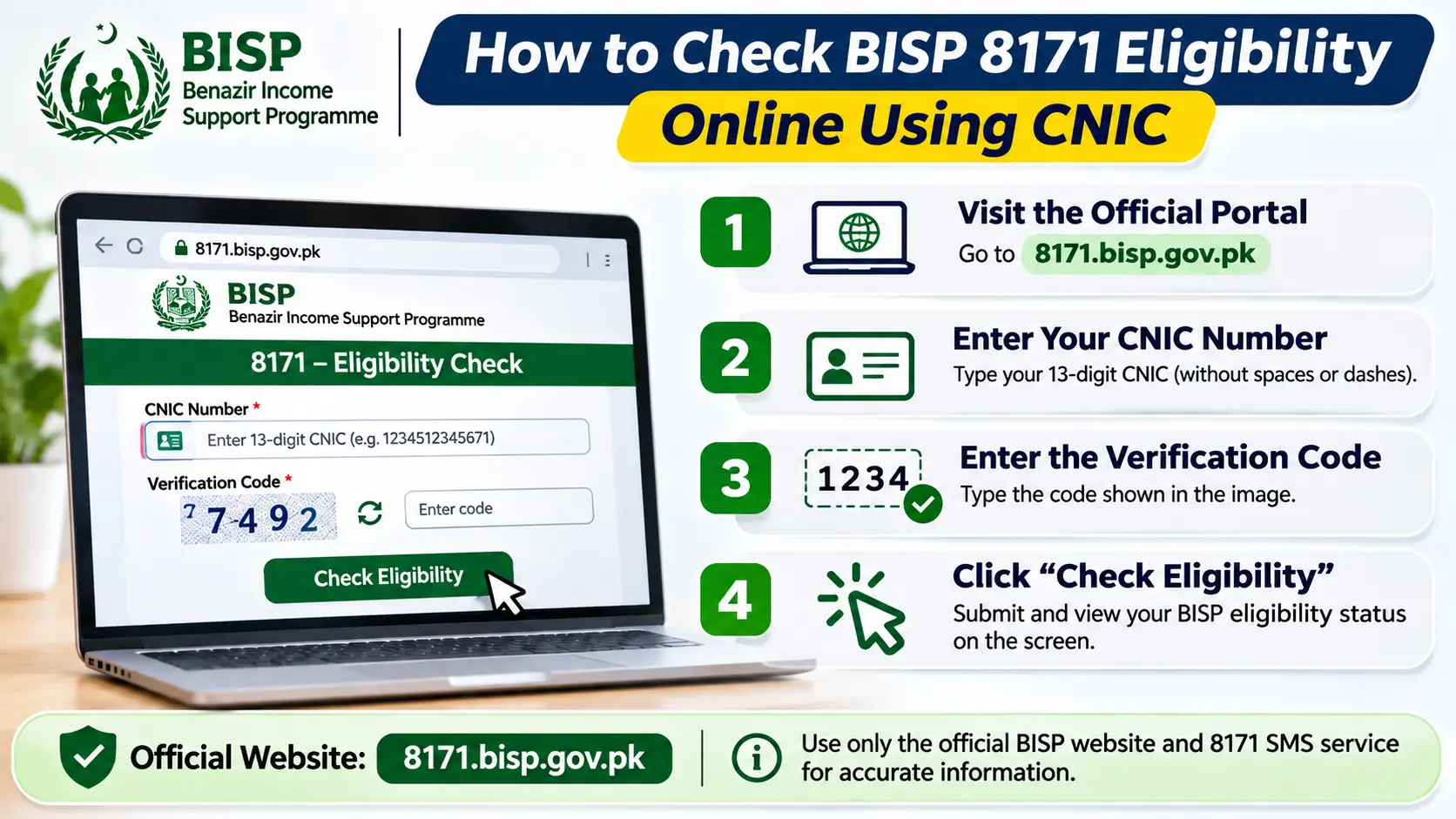
Step 1: Visit the Official 8171 Web Portal
Open the official portal:
Make sure the website address belongs to the official bisp.gov.pk government domain.
Avoid websites that imitate the official portal or ask you to provide unnecessary personal information.
Step 2: Enter Your CNIC Number
On the eligibility checking page, enter your 13-digit CNIC number in the field provided.
Type the number carefully and check it before submitting.
Do not use another person’s CNIC without authorization.
Step 3: Enter the Verification Code
The portal displays an image-based verification code.
Enter the characters shown in the image into the relevant field.
This helps the system distinguish ordinary users from automated requests.
Step 4: Submit Your Information
Select the button provided on the portal to check your household’s status.
If the service is functioning normally, the system should display the eligibility information associated with the submitted CNIC.
Step 5: Read Your Eligibility Status
The response may indicate whether household information is available and what eligibility status or next action applies.
Read the message carefully.
An eligibility inquiry does not necessarily confirm that a payment has been issued or that a particular installment is ready for collection.
Important: The online portal may occasionally be unavailable or fail to load. If that happens, use the official SMS method or contact BISP instead of entering your CNIC on an unknown alternative website.
How to Check BISP Eligibility by SMS to 8171
If you don’t have reliable internet access, BISP’s SMS service offers another way to check your information.
Step 1: Open Your Phone’s Messages App
Use a mobile phone that can send text messages.
Step 2: Enter Your CNIC Number
Type your 13-digit CNIC number without spaces or dashes.
For example, the format is:
XXXXXXXXXXXXX
Use your own actual CNIC number. Never publish it in a public comment or social media post.
Step 3: Send the Message to 8171
Enter 8171 as the recipient and send the message.
Ordinary mobile network SMS charges may apply, depending on your service provider.
Step 4: Check the Reply
Read the response you receive.
It may provide information about your household’s eligibility or direct you to contact a BISP registration centre for further assistance.
If you don’t receive a reply immediately, allow time for a response and check that your mobile network is functioning.
If the issue continues, contact BISP through its official channels.
Online Portal vs SMS: Which Method Is Better?
| Online Portal | SMS to 8171 |
|---|---|
| Requires internet access | Does not require internet |
| Requires CNIC and verification code | Requires CNIC sent by SMS |
| Displays information on the webpage | Sends a reply to your phone |
| Useful for smartphone and computer users | Useful for people with basic mobile phones |
Both methods are intended to help users check information through BISP’s official services.
Remember: Sending an SMS to 8171 is an eligibility inquiry. It does not automatically enroll your household or guarantee financial assistance.
Who Is Eligible for BISP 8171 Financial Assistance?
BISP programmes target households that meet the relevant eligibility and socioeconomic assessment criteria.
For Benazir Kafaalat, BISP uses household information collected through the National Socio-Economic Registry.
The assessment involves a Proxy Means Test (PMT), which estimates a household’s socioeconomic circumstances using survey information.
What Is the PMT Score?
PMT stands for Proxy Means Test.
BISP uses this assessment method to help determine which households qualify for cash assistance under the applicable policy.
Household information may include factors such as:
- Number of household members
- Housing conditions
- Household assets
- Employment and income-related circumstances
- Education and other socioeconomic indicators
- Relevant disability and family information
BISP establishes eligibility thresholds through its official policy.
The approved threshold can change, and special provisions may apply to certain categories of households.
For this reason, applicants should not rely on unofficial websites offering a universal, guaranteed PMT calculation.
Does Being Unemployed Automatically Make You Eligible?
No.
Unemployment may affect a household’s financial circumstances, but being unemployed does not automatically guarantee BISP eligibility.
The programme assesses the household against the relevant criteria.
Can Widows and Persons with Disabilities Qualify?
BISP’s eligibility framework includes provisions relevant to vulnerable households and certain special categories.
Widows, people with disabilities, and families facing difficult economic circumstances may need to ensure their household information is correctly recorded.
However, eligibility is determined through the applicable official process rather than simply by belonging to a particular category.
What Do Different BISP 8171 Status Messages Mean?
When you check your CNIC, the result may indicate that your household is eligible, that information is being assessed, that no record is available, or that your household does not qualify.
The exact wording can vary according to the official system.
1. Eligible
If the system indicates eligibility, it means your household has met the relevant eligibility assessment requirements at that stage.
However, an eligible status should not be confused with confirmation that an installment is ready.
Follow official BISP instructions about payment availability and collection.
2. Under Verification or Assessment
If the system indicates that information is under review, your household’s records may still be undergoing assessment or verification.
Do not assume that approval is guaranteed.
For clarification, contact the nearest BISP Tehsil Office.
3. No Record Found
If your CNIC does not return a household record, it may mean that your household information is missing from the relevant registry or needs verification.
BISP’s official guidance states that an adult household member can visit the nearest Benazir Registration Desk at a BISP Tehsil Office when no record is available.
The staff can explain whether a new NSER survey or another administrative step is required.
4. Not Eligible
A not-eligible result indicates that the household does not currently meet the applicable eligibility requirements.
This does not necessarily mean the household can never qualify in the future.
Changes in household circumstances may be addressed through the official update or reassessment process, subject to BISP rules.
Do not pay an agent who claims they can change your eligibility result.
What Is the BISP NSER Dynamic Survey?
The National Socio-Economic Registry (NSER) is the household database used by BISP for socioeconomic assessment.
BISP has developed a dynamic registration approach so households can provide information or update existing records through designated registration centres.
This is particularly relevant for families who were not previously surveyed or whose information has changed.
Who May Need an NSER Survey?
A survey or record update may be relevant when:
- Your household has no available NSER record.
- You have not previously participated in the household survey.
- Important household information has changed.
- BISP instructs you to complete a survey or recertification.
- Your existing record contains information that requires correction.
Not every household needs to complete a fresh survey immediately.
BISP has stated that households already surveyed may be subject to restrictions on how frequently another survey can be conducted.
Existing beneficiaries may also need periodic recertification.
Follow BISP’s official instructions for your household.
How to Complete the BISP Dynamic Survey
The BISP Dynamic Survey is conducted through designated registration facilities.
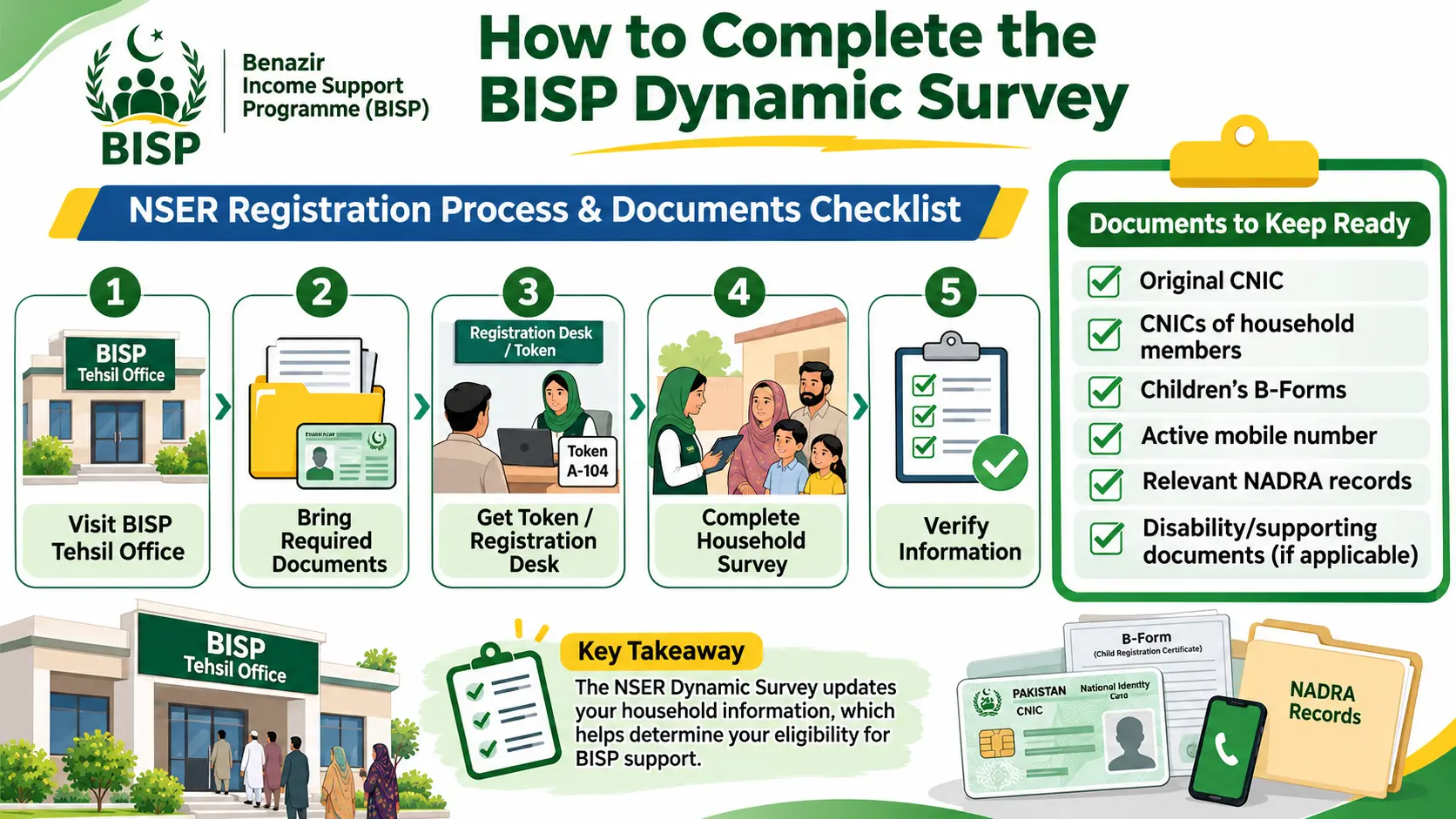
Step 1: Visit a BISP Tehsil Office
Locate the nearest authorized BISP Tehsil Office or Benazir Registration Centre.
Use official BISP contact information when finding an office.
Step 2: Bring Your Identification Documents
Take your original CNIC and other relevant household documents.
BISP’s published NSER guidance identifies household members’ CNICs and children’s B-Forms as important documents for registration.
Step 3: Report to the Information Desk
Explain that you want to check your household’s survey status or update your information.
Staff may review your record and provide instructions or a token.
Step 4: Complete the Required Interview
An authorized data entry officer may ask questions about household members, living conditions, employment, education, income, and other socioeconomic circumstances.
Provide accurate answers.
Step 5: Confirm Your Information
Check that your identification information and household details are recorded correctly.
If there are errors in your CNIC or family records, BISP may instruct you to update the relevant information through NADRA.
Step 6: Follow the Official Instructions
After the survey, allow the official verification and assessment process to take place.
Survey completion alone does not guarantee selection for Benazir Kafaalat.
You can later use the official eligibility checking services or contact BISP for further guidance.
The BISP registration and survey process is free. Do not pay an unofficial agent for inclusion in the programme.
Documents Required for BISP Registration and Survey
Preparing the correct documents can help avoid unnecessary visits.
| Document | Why It May Be Needed |
|---|---|
| Original CNIC | Identity verification |
| CNICs of household members | Household record information |
| Children’s B-Forms | Children’s registration details |
| Active mobile number | Contact and official communication |
| Relevant NADRA records | Updating marital or household information |
| Disability or other supporting documents | Where applicable to the household’s circumstances |
Exact requirements depend on the household and the instructions issued by the registration centre.
If you are unsure which documents to take, contact the nearest BISP Tehsil Office before travelling.
What If Your BISP CNIC Check Shows No Record?
A “No Record” result can be confusing, especially if your household is experiencing financial hardship.
However, it does not automatically mean your family has been permanently rejected.
Possible next steps include:
- Confirm that you entered the correct CNIC number.
- Check that your CNIC is valid and your NADRA information is accurate.
- Visit an official BISP Tehsil Office.
- Ask whether your household requires an NSER survey or record update.
- Follow the official instructions for assessment.
Avoid submitting your CNIC to multiple unofficial websites claiming to register you instantly.
How to Check BISP 8171 Payment Status
Eligibility and payment availability are related but separate matters.
A household can be recognized as eligible without a particular payment being available for collection at that moment.
BISP communicates payment-related instructions through its official channels.
If you are already a beneficiary, you should wait for the relevant official notification before visiting a payment centre.
BISP has advised beneficiaries to visit designated payment locations after receiving the applicable message from 8171.
What Documents Should You Take to Collect a Payment?
Eligible beneficiaries should follow the instructions issued by BISP.
The original CNIC is an important document for identity verification.
Depending on the current payment arrangement, biometric verification or other authorized verification procedures may be required.
Payment locations and methods can change, so do not assume that an older retailer or payment centre remains authorized for every installment.
What Is the Current BISP Payment Amount?
Benazir Kafaalat payment amounts may change through government decisions.
Different BISP programmes, payment periods, and special assistance arrangements can also have different amounts.
For this reason, do not rely on outdated social media posts or older articles showing a fixed amount.
Confirm your current entitlement and payment instructions directly through BISP’s official channels.
What to Do If You Have a BISP Payment Problem
If your payment is delayed, an unauthorized deduction occurs, or you experience a problem at a designated payment centre, report it through official channels.
BISP Complaint Helpline: 0800-26477
You can also visit the nearest BISP Tehsil Office for assistance.
When reporting a complaint, explain the issue clearly and keep any relevant transaction or payment information available.
Never disclose your PIN, OTP, or other sensitive credentials to an unknown person claiming to provide assistance.
BISP 8171 Fraud Warning: How to Protect Your CNIC and Money
BISP-related scams frequently target people seeking financial assistance.
Fraudsters may send fake messages, make misleading phone calls, or create websites that resemble government services.
Common Warning Signs
Be careful if someone:
- Asks you to pay a fee to confirm BISP eligibility.
- Promises guaranteed approval in exchange for money.
- Sends a BISP payment message from a number other than 8171.
- Requests your OTP, PIN, or sensitive financial credentials.
- Asks you to share your CNIC photograph through an unknown WhatsApp contact.
- Claims an unofficial website can change your PMT score instantly.
- Demands a percentage of your payment as a processing fee.
How to Stay Safe
Use only the official BISP website and authorized services.
Official website: https://www.bisp.gov.pk/
Official eligibility portal: https://8171.bisp.gov.pk/
Official SMS number: 8171
Complaint helpline: 0800-26477
Remember that the BISP registration and survey process does not require payment to an agent.
Common Problems When Checking 8171 Eligibility
Problem 1: The 8171 Website Is Not Opening
The website may be temporarily unavailable because of technical issues or heavy traffic.
Try again later, or use the official SMS method.
Avoid unofficial websites advertised as guaranteed alternatives.
Problem 2: You Entered the Wrong CNIC Number
Check the number carefully.
Make sure all 13 digits are correct.
Problem 3: You Did Not Receive an SMS Reply
Confirm that the SMS was sent to 8171 and that your mobile service is working.
If you continue having problems, contact BISP.
Problem 4: Your Household Details Have Changed
Visit an authorized registration centre to ask about updating your NSER record.
You may also need to correct information through NADRA.
Problem 5: Your Survey Is Complete but You Have Not Received a Payment
Completing the survey is not the same as receiving approval for cash assistance.
The household must meet the relevant eligibility requirements and complete the required verification.
Contact BISP for information about the next step.
BISP 8171 Eligibility Check: Frequently Asked Questions
1. How can I check BISP 8171 eligibility online?
Visit the official 8171 web portal, enter your 13-digit CNIC number and the image verification code, and submit the information to view the available household eligibility status.
2. What is the official BISP 8171 website?
The official eligibility checking portal is https://8171.bisp.gov.pk/.
3. How can I check BISP eligibility without internet?
Send your 13-digit CNIC number by SMS to 8171 and follow the official reply.
4. Is BISP 8171 registration free?
BISP states that registration and the NSER survey are free. Do not pay an agent who promises guaranteed enrollment.
5. Can I register for BISP by sending my CNIC to 8171?
Sending your CNIC to 8171 is a way to check eligibility information. It does not automatically complete an NSER household survey or guarantee registration as a beneficiary.
6. What should I do if my CNIC shows no record?
Visit a BISP Tehsil Office to ask whether your household needs an NSER survey or record update.
7. Does an eligible status mean my payment is ready?
Not necessarily. Eligibility and payment availability are different. Follow official payment notifications and instructions.
8. Who qualifies for Benazir Kafaalat?
Eligibility is determined using the applicable BISP criteria, including household socioeconomic assessment through NSER and the relevant PMT rules.
9. What is the BISP complaint number?
The official BISP complaint helpline is 0800-26477.
10. Can I check another person’s BISP status using their CNIC?
Only use another person’s identification information when you are authorized to assist them. Avoid publicly sharing or collecting other people’s CNIC details.
11. What if I receive a BISP payment message from a different number?
BISP identifies 8171 as its official SMS number. Treat payment or registration messages from other numbers as suspicious and verify them through official channels.
12. Do existing beneficiaries need another survey?
BISP has announced periodic recertification requirements for existing beneficiaries, including reassessment after three years. Follow any survey or recertification notice applicable to your household.
13. Can I check my PMT score on any online website?
Avoid unofficial PMT score calculators and websites that claim to guarantee eligibility. Use the official BISP service and contact a registration centre for questions about your household’s assessment.
14. Can someone guarantee BISP approval after taking a fee?
No legitimate agent can guarantee approval. Eligibility depends on BISP’s official assessment process.
Conclusion
Checking your BISP 8171 eligibility status is an important first step if your household needs financial support through the Benazir Income Support Programme.
You can use the official 8171 web portal or send your CNIC number by SMS to 8171 to check the available eligibility information.
If your household has no record, or its information needs updating, visit a designated BISP Tehsil Office for guidance about the NSER Dynamic Survey.
Remember that completing a survey does not guarantee approval, and being eligible does not automatically mean a payment is ready.
Most importantly, use official BISP services and never pay anyone who promises guaranteed registration or financial assistance.
For more useful guides about Pakistani government assistance programmes, visit EduRozgar’s Govt Schemes section.
Official Sources and References
- Benazir Income Support Programme — Official Website
- BISP 8171 — Official Eligibility Portal
- BISP — How to Check Benazir Kafaalat Eligibility (Official Guide)
- BISP — NSER Registration Process at Registration Centres
- BISP — National Socio-Economic Registry Information
- Ministry of Poverty Alleviation and Social Safety
Last Updated: November 8, 2026
Disclaimer: EduRozgar is an independent informational website and is not affiliated with BISP or the Government of Pakistan. This article provides general guidance based on official programme information. Eligibility criteria, payment arrangements, and administrative procedures may change. Always verify your individual status and current requirements through official BISP services.